


Pharmacy POS & Inventory Management System
Complete Pharmacy Point of Sale, Medicine Inventory, Batch & Expiry Management Solution
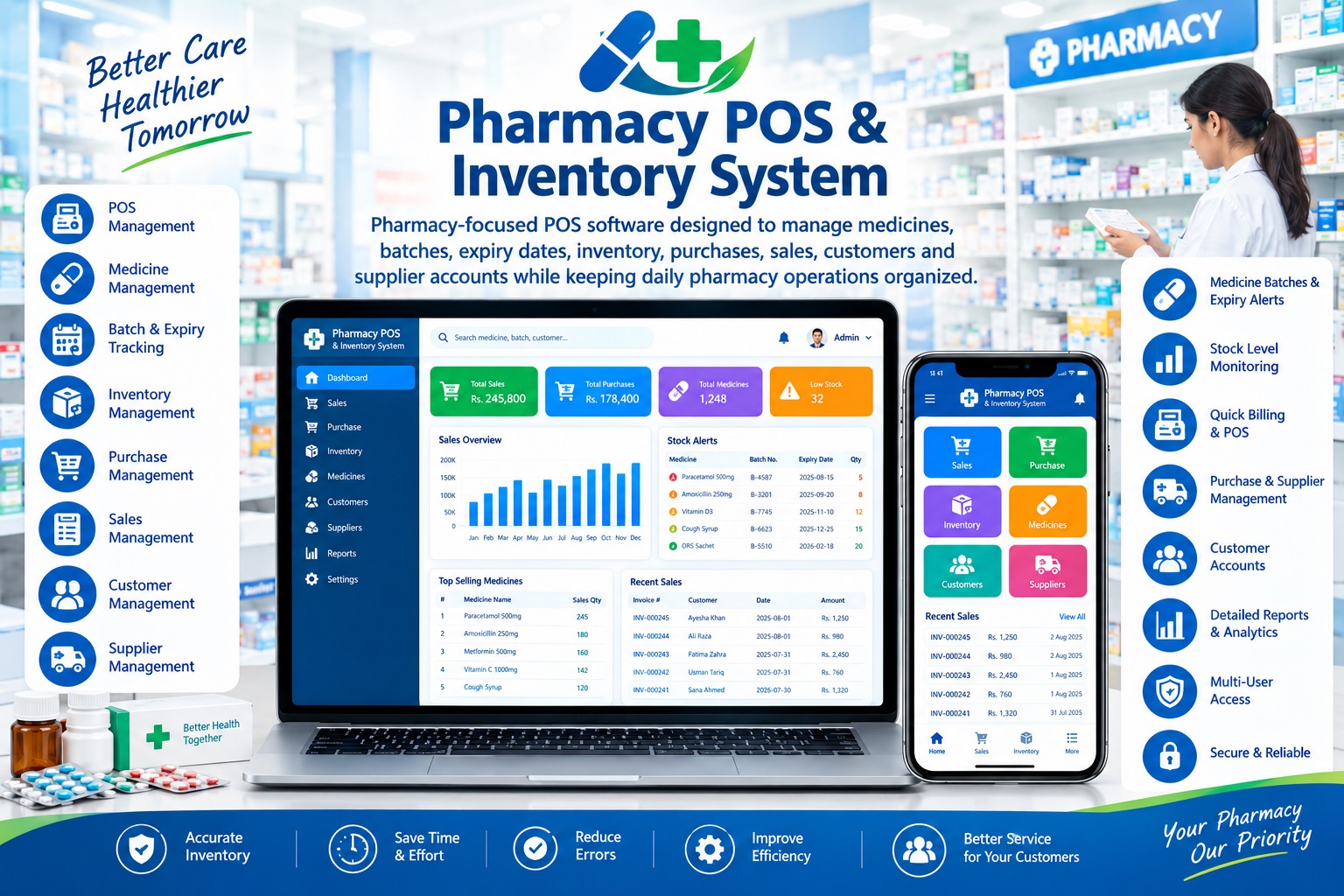
Pharmacy POS & Inventory Management System is a professional cloud-ready pharmacy management solution designed specifically for retail pharmacies, medical stores, hospital pharmacies, clinics and medicine distributors.
Manage your complete pharmacy operation from one centralized platform — including medicines, brands, generic names, batches, expiry dates, stock, purchases, sales, customers, suppliers, payments and accounts.
The system helps pharmacy businesses sell medicines faster, control stock accurately, reduce expiry-related losses, monitor batch information and maintain complete financial control.
Features:
- 💊 Core Pharmacy Features
- 1. Professional Pharmacy POS
- A fast and user-friendly POS screen designed for busy pharmacy counters.
- Quick medicine search
- Product/code search
- Barcode scanning
- Medicine name search
- Generic name search
- Brand search
- Batch-based stock selection
- Quantity entry
- Selling price
- Discount management
- Tax/VAT support
- Cash sales
- Credit sales
- Partial payments
- Multiple payment methods
- Automatic invoice calculation
- Professional sales invoice
- POS/thermal printer support
- A4 invoice printing
- Sales return support
- Fast Counter Billing
- Search for a medicine, select the required batch, enter quantity and generate the invoice in seconds.
- 🧴 2. Medicine/Product Management
- Maintain a complete digital catalog of medicines and pharmacy products.
- Medicine Information
- Medicine/product code
- Barcode
- Medicine name
- Generic name
- Brand
- Manufacturer
- Category
- Dosage form
- Strength
- Pack size
- Unit
- Purchase price
- Selling price
- Wholesale price
- Minimum stock level
- Reorder level
- Product status
- Product description
- Product Categories
- Manage categories such as:
- Tablets
- Capsules
- Syrups
- Injections
- Creams
- Ointments
- Drops
- Suspensions
- Antibiotics
- Vitamins
- Medical Devices
- Surgical Items
- Personal Care
- Baby Care
- Other Pharmacy Products
- 🧪 3. Batch Management
- Batch management is one of the most important features for a pharmacy.
- Maintain separate stock records for every medicine batch.
- Track:
- Batch number
- Medicine
- Manufacturer
- Purchase date
- Manufacturing date
- Expiry date
- Purchase price
- Selling price
- Quantity received
- Quantity sold
- Available quantity
- Batch status
- Supplier
- Batch-Level Stock Control
- The same medicine can have multiple batches with different expiry dates and prices. The system keeps each batch separately so pharmacy staff can identify exactly which batch is being sold.
- ⏰ 4. Expiry Date Management
- Reduce losses caused by expired medicines.
- Expiry Monitoring
- Identify medicines:
- Already expired
- Expiring today
- Expiring this month
- Expiring within 30 days
- Expiring within 60 days
- Expiring within 90 days
- Expiring within a customized period
- Expiry Reports
- Generate:
- Expired medicine report
- Near-expiry report
- Batch-wise expiry report
- Supplier-wise expiry report
- Product-wise expiry report
- This helps management take action before medicines become unsellable.
- 📦 5. Complete Inventory Management
- Maintain real-time control over pharmacy stock.
- Track:
- Opening stock
- Purchased stock
- Sold stock
- Sales returns
- Purchase returns
- Stock adjustments
- Damaged stock
- Expired stock
- Current stock
- Batch-wise stock
- Stock Movement
- Every inventory movement can be traced through:
- Purchase → Stock → Sale → Return → Adjustment
- This provides better accountability and reduces unexplained stock differences.
- 🛒 6. Purchase Management
- Record medicine purchases from suppliers efficiently.
- Purchase Entry
- Supplier
- Purchase invoice number
- Purchase date
- Medicine
- Batch number
- Manufacturing date
- Expiry date
- Quantity
- Purchase price
- Selling price
- Discount
- Tax
- Total amount
- Paid amount
- Outstanding amount
- Automatic Stock Update
- Once a purchase is recorded, the corresponding batch quantity is added automatically to inventory.
- 🔄 7. Purchase Returns
- Manage medicines returned to suppliers.
- Suitable for:
- Damaged products
- Incorrect products
- Excess stock
- Near-expiry stock
- Expired products
- Supplier returns
- Features include:
- Supplier selection
- Purchase reference
- Batch selection
- Return quantity
- Return amount
- Return reason
- Automatic stock deduction
- Supplier account adjustment
- 🧾 8. Sales & Pharmacy Billing
- Record all pharmacy sales with complete transaction details.
- Sales Invoice
- Includes:
- Invoice number
- Date/time
- Customer
- Medicine/product
- Batch
- Expiry
- Quantity
- Unit price
- Discount
- Tax
- Total
- Paid amount
- Balance
- Payment method
- Automatic Processing
- When a sale is completed:
- Stock decreases → Batch quantity updates → Customer account updates → Sales record is created
- 🔁 9. Sales Returns
- Manage customer medicine returns while maintaining inventory accuracy.
- Invoice-based return
- Product selection
- Batch selection
- Return quantity
- Return reason
- Refund/adjustment
- Customer balance update
- Stock adjustment
- Return history
- 👤 10. Customer Management
- Maintain complete customer information.
- Customer ID
- Customer name
- Mobile number
- WhatsApp number
- Address
- Customer type
- Credit limit
- Account balance
- Sales history
- Payment history
- Outstanding balance
- Customer statement
- Customer Purchase History
- Quickly view what a customer has purchased, when it was purchased and the associated invoice.
- 🏢 11. Supplier Management
- Maintain detailed supplier accounts.
- Supplier Profile
- Supplier code
- Supplier name
- Contact person
- Mobile
- Address
- Tax information
- Account status
- Supplier Account
- Track:
- Purchases
- Purchase returns
- Payments
- Outstanding balance
- Supplier ledger
- Supplier statements
- Key Highlights
- ✅ Pharmacy-Focused POS
- ✅ Medicine/Product Management
- ✅ Generic & Brand Management
- ✅ Barcode Support
- ✅ Batch Management
- ✅ Expiry Date Tracking
- ✅ Near-Expiry Alerts
- ✅ Expired Medicine Reports
- ✅ Real-Time Inventory
- ✅ Low Stock Alerts
- ✅ Reorder Level Management
- ✅ Purchase Management
- ✅ Purchase Returns
- ✅ Sales Management
- ✅ Sales Returns
- ✅ Customer Management
- ✅ Supplier Management
- ✅ Customer Credit Management
- ✅ Supplier Payables
- ✅ Customer Ledger
- ✅ Supplier Ledger
- ✅ Payment Management
- ✅ Partial & Full Payments
- ✅ Professional Invoices
- ✅ Payment Receipts
- ✅ Stock Adjustments
- ✅ Damaged & Expired Stock Tracking
- ✅ Stock Movement History
- ✅ Product/Batch-wise Reporting
- ✅ Sales & Purchase Reports
- ✅ Customer & Supplier Statements
- ✅ Profit & Margin Analysis
- ✅ Dashboard & KPIs
- ✅ A4 Printing
- ✅ Thermal POS Printing
- ✅ Responsive Web Interface
- ✅ Cloud-Ready Architecture
- ✅ Role-Based User Access